

Where the design came from
I used to run everything on one HP ProDesk on the router’s default network. That setup taught me three things I did not enjoy learning:
- Servers and home devices sat in the same DHCP pool. My Proxmox host was a neighbor to every phone and TV that joined.
- Exposing a service meant a port forward on the router. The router became the attack surface, and every service added another row to it.
- I kept internal addresses in my head. Then in a text file. Then in two disagreeing text files.
So the redesign had three requirements, in order: stop exposing the router, get devices away from servers, and make every address and URL knowable without memorizing anything.
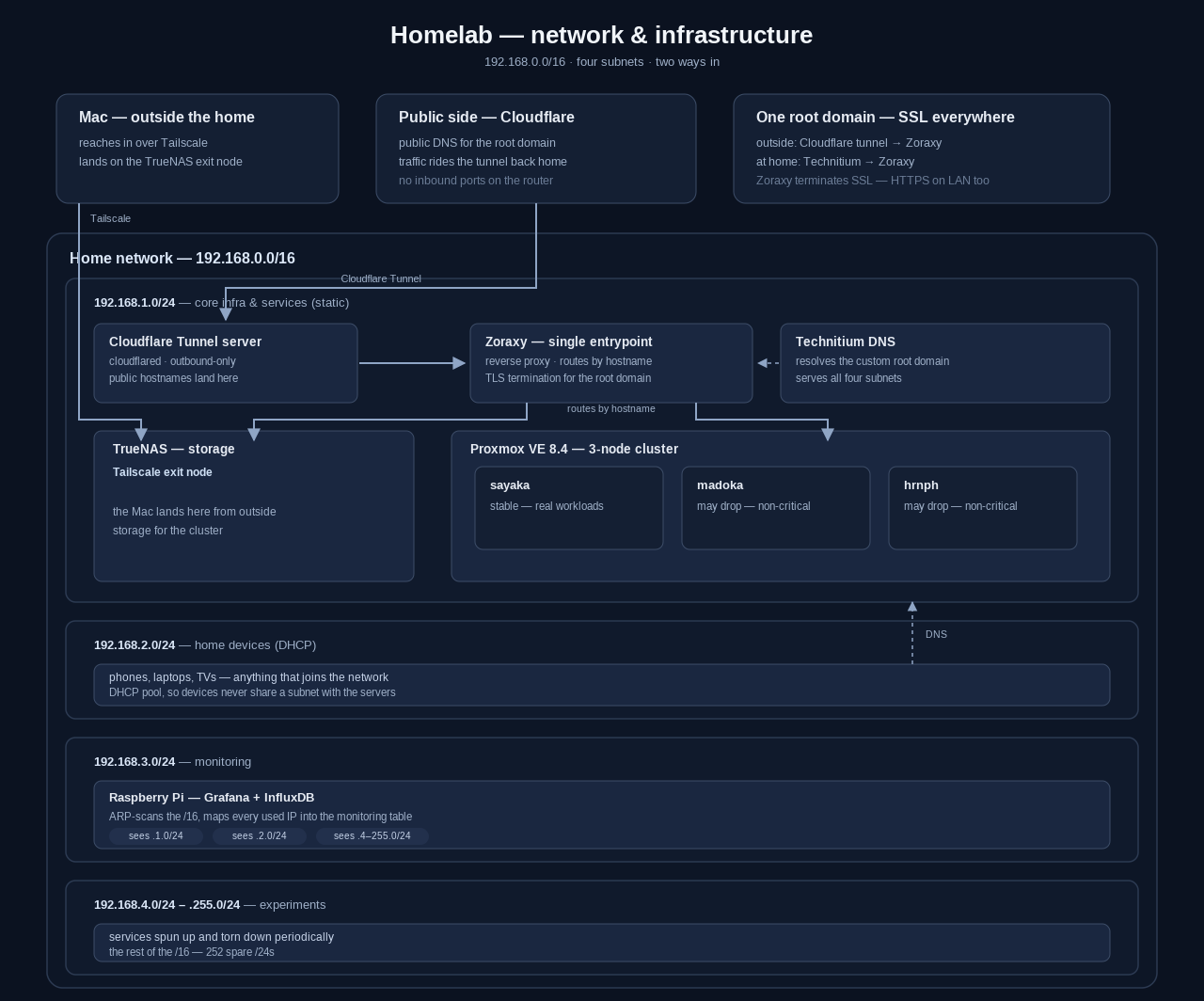
Getting traffic in without opening the router
The first problem is ingress. The options I weighed:
- Port forwarding with dynamic DNS. The default. It keeps the router as the front door, needs a DDNS client fighting my ISP for a changing IP, and every exposed service is a listening port a scanner can find. Rejected.
- A cheap VPS relaying to home over WireGuard. Closes the home router, but now I pay monthly for, and maintain, a box whose only job is being a door. Rejected for a homelab.
- Cloudflare Tunnel. A
cloudflaredprocess inside the house dials out to Cloudflare and stays connected. Public traffic rides that connection backwards. The router forwards nothing. I picked this one.
The path every public service takes:
hostname → Cloudflare edge → tunnel → tunneling server → Zoraxy → backend
A service goes public by getting a hostname routed through the tunnel. That is the entire exposure mechanism, so the exposure list is one list. If a service is not on it, it is not public. There is no second door to forget about.
The tradeoff: Cloudflare sits in the path of public traffic. For a homelab that is an acceptable landlord. If it is not for you, option 2 is the honest alternative.
The second door, mine only
Friends and strangers get the Cloudflare path. I get a different one, because my access should not depend on a third party or on which services are marked public.
The candidates were exposing SSH (a listening port, defeats the point), running a VPN server on the router (the router again, plus firmware lock-in), or Tailscale with an exit node somewhere inside. I run the exit node on the TrueNAS, and the choice of host is deliberate: the NAS is always on and it is the one machine I never rebuild casually, so my way home stays stable while the cluster churns around it.
Any device of mine on the tailnet routes into the LAN from anywhere. One quirk to design around: the path is one-way. Tailnet devices reach the LAN, the LAN cannot initiate anything back to them, so nothing inside the lab depends on a return channel to my laptop.
Why everything funnels through one box
Both tunnels land, and the next decision is what they land into. The failure mode I wanted to avoid is every service handling its own exposure: one app behind nginx with hand-written configs, another doing its own TLS, a third with an auth bypass I forgot about.
The candidates: raw nginx or Caddy (fine, but the exposure surface lives in config files, and reviewing them is a chore), Traefik (great when everything is Docker labels, awkward otherwise), or Zoraxy, a reverse proxy built around exactly this job: hostname routing, TLS termination, and a UI that shows every routed service in one list.
I picked Zoraxy because it matches the requirement directly: one box, one list, one place where TLS terminates and renews. A service is reachable if and only if it has a hostname there. Remove the hostname, it is gone from the internet.
Making one URL work on both sides
The awkward part of tunnel-based ingress is the inside. A visitor hits app.domain.com through Cloudflare, but from my couch that same hostname goes out to the internet and comes back, or worse, I keep an internal 192.168.1.x:8443 habit alive. Split-brain URLs were the thing I wanted dead.
The fix needs internal DNS that resolves the root domain, not just blocks ads. That rules out Pi-hole and AdGuard-style tools, which are filters, not name servers. Technitium DNS actually hosts the zone:
outside: hostname → Cloudflare → tunnel → Zoraxy
inside:  hostname → Technitium → Zoraxy
Both paths end at Zoraxy, which terminates TLS for the root domain with a real certificate, regardless of where the traffic came from. One URL per service, valid HTTPS on the LAN and off it. The IP
Carving the /16 by purpose
Ingress solved, the remaining problem was the flat network: devices I do not control next to servers, and experiments stacking up beside production.
The obvious tool is VLANs, but that pulls in a managed switch and router config for a household. The lighter version gets the same separation: route the house as 192.168.0.0/16 and give each purpose its own /24 inside it.
| Subnet | Purpose | Addressing |
|---|---|---|
192.168.1.0/24 | Core infra: Proxmox cluster, TrueNAS, Zoraxy, Technitium, both tunnel servers | static only, no DHCP |
192.168.2.0/24 | Home devices: phones, laptops, TVs | DHCP pool |
192.168.3.0/24 | Monitoring: Raspberry Pi, Grafana, InfluxDB | static |
192.168.4.0/24 - .255.0/24 | Experiments | per-experiment |
The reasoning per range:
.1 is static-only because the entrypoint stack depends on addresses not moving. DNS records, tunnel targets, and proxy upstreams all point here. DHCP on the server range would be a self-inflicted race condition.
.2 carries DHCP so home devices join the network without ever sharing a subnet with servers. The TV and the Proxmox host are in different broadcast domains. A compromised phone has servers nowhere adjacent to it.
.4 through .255 is the lab range, and the subnet itself is the cleanup unit: each experiment gets its own /24, and when it dies the subnet dies with it. This is the direct answer to “temporary” services quietly becoming permanent. There are 252 of them, so the headroom is effectively unlimited.
The network watching itself
The last requirement was knowability: every IP accountable. Router DHCP lease tables only cover DHCP clients, which misses every static server and every experiment.
So 192.168.3.0/24 runs a Raspberry Pi with Grafana and InfluxDB, ARP-sweeping the whole /16 on a schedule and writing every used address into a time-series table. First-seen timestamps mean an unknown IP is a row with a date on it, and a stale experiment address is visible as one that stopped answering.
It runs on a Pi off the cluster on purpose. Monitoring that dies with the cluster is useless exactly when you need it.
Three nodes, one of them trusted
The compute layer, all on .1: a 3-node Proxmox VE 8.4 cluster plus the TrueNAS. The nodes were not acquired equal, and pretending otherwise just moves the failure. So placement is a policy: exactly one node takes stateful work, databases, anything that hurts to lose. The other two take disposable workloads and experiments.
NOTERule for the cluster: the sum of every guest’s max RAM on a node stays under 85% of the node’s real capacity, checked before every create, clone, or resize.
The reason is Proxmox’s RAM cache. If allocated memory is allowed to reach 100%, one synchronized spike across guests can squeeze out the cache and drop the node with all its guests on board. The 85% ceiling keeps that failure mode from existing at all.
What the design adds up to
Reading the diagram top to bottom is reading the decisions in order: the router forwards nothing, so two tunnels dial out; the tunnels need a landing point, so Zoraxy is the single door; one URL everywhere, so Technitium hosts the zone; devices separated from servers and experiments quarantined, so the /16 is carved into four purposes; and a Pi outside the cluster watches the whole thing, so nothing on the network is ever anonymous.
Each choice exists because of a problem the previous one either created or left open. That is the whole design.